

If your website has suddenly dropped in Google rankings, the culprit might be hiding in your backlink profile. Many website owners focus only on building new links, but they forget to clean up the old, dangerous ones. Toxic backlinks are like broken bones in your SEO body. They hurt your site silently until one day you wake up to a manual penalty or a traffic crash. The good news is that you can remove toxic backlinks with a clear, step‑by‑step process. This guide will show you exactly how to find, remove, and disavow harmful links so you can recover your rankings and protect your site for the long term.
Off-Page SEO Checklist for Beginners
Why You Must Remove Toxic Backlinks Before It Is Too Late
Google’s algorithm has become smarter than ever. It no longer ignores spammy links pointing to your website. Instead, it sees them as a sign that you might be trying to manipulate rankings. Even if you did not build those links yourself, Google can still penalise you. Toxic backlinks usually come from link farms, hacked websites, low‑quality directories, or automated blog comments. When Google finds too many of these links pointing to your site, it may decide to lower your rankings or remove your pages from search results entirely. That is why you cannot afford to wait. Learning how to remove toxic backlinks is not just an optional cleanup task. It is a critical part of modern SEO that every site owner must perform at least once every few months.
How to Identify Toxic Backlinks in Your Profile
Before you can remove toxic backlinks, you need to know which links are actually dangerous. Not every low‑authority link is toxic. A few weak links from unrelated sites are usually harmless. But when you see patterns of spam, that is when you must take action. You can use free tools like Google Search Console or paid tools like Ahrefs, Semrush, or Moz to download your full backlink list. Look for the following red flags. Links from sites with a very low domain authority (below 10) that have no real content. Links coming from foreign, unrelated languages that do not match your audience. Links with over‑optimised anchor text like “best cheap Viagra” or “payday loans”. Links from websites that Google has already deindexed. And finally, links that come from automated sources such as forum signatures or comment sections without moderation.
Once you have identified these suspicious links, create a list of the exact URLs that point to your site. You will need this list for the next steps. A beneficial rule is to focus on links that are clearly unnatural and that you would never build on purpose.
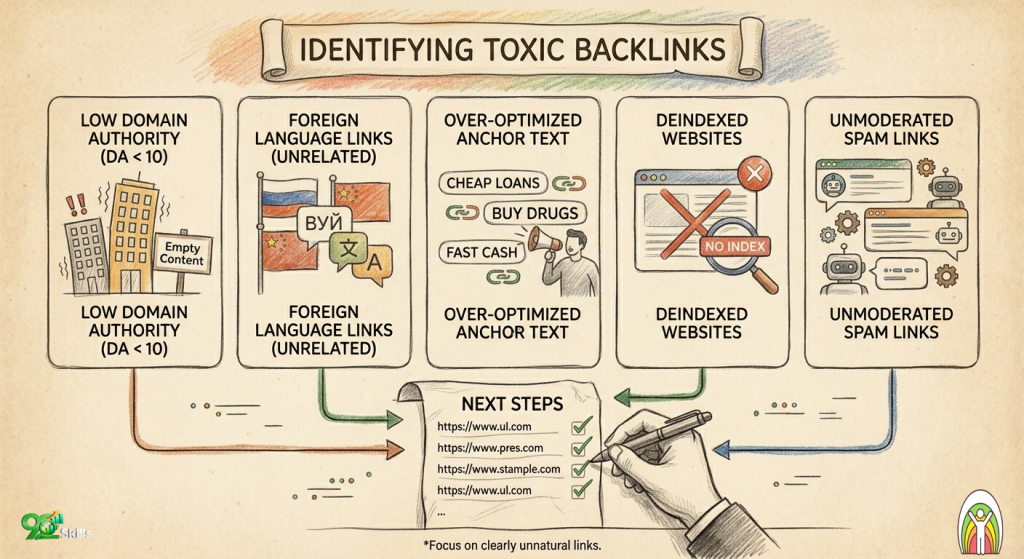
Identify toxic backlinks early—focus on spam patterns & Remove Toxic Backlinks.
Step‑by‑Step Process to Remove Toxic Backlinks Manually
The first and most effective way to remove toxic backlinks is to contact the webmasters of the linking sites and ask them to delete the links. This method works best when the link is on a real website that has a human owner. Many small blog owners are happy to remove a spammy link if you ask politely. To do so, find the contact email address on the offending website. Then write a short, polite message explaining that you have found a link to your site that you did not approve. Ask them to remove the link or change it to a nofollow attribute. Keep your email simple and do not accuse them of spamming. Most of the time, the link was placed without their knowledge. After sending the email, please wait for about two weeks. If the link is still there, send a gentle reminder. You have successfully cleaned your backlink profile without using Google’s disavow tool for every removed link.
When Manual Removal Fails – Using the Google Disavow Tool
Sometimes you cannot remove toxic backlinks manually because the website no longer exists, the webmaster never replies, or the site is a pure spam domain with no contact information. In those cases, you need to use the Google Disavow Tool. This tool tells Google to ignore specific links when assessing your site. It does not actually remove the links from the internet, but it stops them from hurting your rankings. The Disavow Tool is powerful and dangerous. If you disavow the wrong links, you could lose valuable link equity. Use it only for links that are clearly toxic and that you have tried and failed to remove manually.
To access the Disavow Tool, go to Google Search Console, select your property, and find the Disavow Links page under the Legacy Tools section. You will need to upload a text file containing the list of links or domains you want Google to ignore. You can disavow individual URLs or entire domains. Disavowing an entire domain is faster and safer if every link from that domain is spammy. For example, if you have fifty links from the same spam website, just add domain:spamwebsite.com to your file.
How to Prepare Your Disavow File Correctly
Before you upload anything, you must prepare your disavow file properly. Use a simple text editor like Notepad to create a .txt file. Start each line with disavow followed by the link or domain. To disavow one specific URL, write disavow https://spamdomain.com/spammy-page. To disavow an entire domain, write domain:spamdomain.com. Do not add any extra spaces or special characters. Save the file with a name like disavow-2026.txt. Then go back to the Disavow Tool and upload it. Google will process the file within a few days, but the effects on your rankings may take several weeks to appear. After uploading, monitor your Search Console for any changes in manual actions or traffic.
What to Do After You Remove Toxic Backlinks
Your work does not end when you remove toxic backlinks or upload a disavow file. You now need to submit a reconsideration request if Google had already issued a manual penalty against your site. To achieve this, go to the Manual Actions section in Google Search Console. If you see a notice about “unnatural links to your site”, click the Request Review button. Please clearly articulate that you have refined your backlink profile. Mention that you contacted webmasters and removed what you could and then used the Disavow Tool for the rest. Please attach your disavow file along with any evidence of removal emails. Google usually replies within a week or two. If your request is approved, the penalty will be lifted, and your rankings can slowly return.
Even if you never had a manual penalty, cleaning toxic links often leads to a slow but steady ranking improvement over the next two to three months. You should also start building high‑quality, relevant backlinks from trusted websites to replace the ones you removed. A clean profile with fewer but stronger links will always outperform a spammy profile with thousands of useless links.
Common Mistakes That Ruin Your Disavow Efforts
Many people try to remove toxic backlinks but end up hurting their SEO because of simple mistakes. The most common mistake is disavowing good links by accident. If you are not sure whether a link is toxic, leave it alone. Only disavow links that are clearly unnatural and harmful. Another mistake is disavowing individual URLs when disavowing the whole domain would be more efficient. A third mistake is forgetting to keep a backup of your original disavow file. If you later realise you made an error, you will need to upload a new file that overrides the old one. Without the original list, you might not know which domains to unblock. Finally, some people use the Disavow Tool without first trying to remove links manually. Google expects you to make a good faith effort to contact webmasters before using the tool. Skipping this step can make your reconsideration request look lazy.
How Often Should You Remove Toxic Backlinks?
You should plan to remove toxic backlinks at least twice every year. However, if your niche is highly competitive or if you have been the target of negative SEO attacks, you may need to check every month. Negative SEO happens when someone deliberately builds thousands of spammy links to your site to try to get you penalised. In that case, act immediately. Download your new backlinks weekly and disavow any fresh spam domains as soon as they appear. For most normal websites, a biannual backlink audit is enough. Set a calendar reminder for January and July each year to run a full check.
Free Tools to Help You Remove Toxic Backlinks
You do not need expensive software to remove toxic backlinks. Google Search Console is completely free and shows you the top links to your site. The Links report under Search Console lists the most linked pages and the top linking domains. This is the best place to start because these are the links Google itself sees. For a more detailed analysis, you can use the free version of Ahrefs Webmaster Tools, which gives you a backlink profile for your verified site. Another excellent free tool is SEO SpyGlass from LinkAssistant, which has a free trial that lets you check link toxicity scores. Remember that no automated tool is perfect. Always review each suspicious link with your own eyes before deciding to disavow it.
Final Checklist for a Successful Toxic Backlink Cleanup
To summarise everything you have learnt, follow this final checklist. First, download your full backlink list from Google Search Console or a third‑party tool. Second, filter out all clearly spammy links that come from low‑quality, irrelevant, or hacked websites. Third, try to contact the webmasters of those sites and ask them to remove the links. Keep a record of every email you send. Fourth, wait two weeks for responses. Fifth, for links that remain, create a disavow file with the remaining spam domains. Sixth, upload your disavow file to Google’s Disavow Tool. Seventh, if you had a manual penalty, submit a reconsideration request with all your evidence. Eighth, monitor your rankings and traffic for the next two to three months. Finally, schedule your next backlink audit for six months from now.
Conclusion – Take Action Today to Protect Your Website
Toxic backlinks are not a myth. They are a real threat that can destroy years of SEO work in a single algorithm update. The good news is that you have complete control over your backlink profile. By learning how to remove toxic backlinks step by step, you can clean out the spam, recover from penalties, and even improve your rankings. Do not wait until Google sends you a manual action notice. Run your first backlink audit this week. Identify the dangerous links, contact the site owners, and prepare your disavow file if needed. The process takes a few hours, but the peace of mind and the long‑term SEO protection are priceless. Your website deserves a clean, healthy link profile. Start removing toxic backlinks today and watch your rankings climb back to where they belong.